Available on
About ArtWingman
Artwingman was not designed at a software company's drawing board — it was born in daily studio practice. As a painter, I was tired of pushing my reference images through generic graphics programs that were never built for the needs of analog painting.
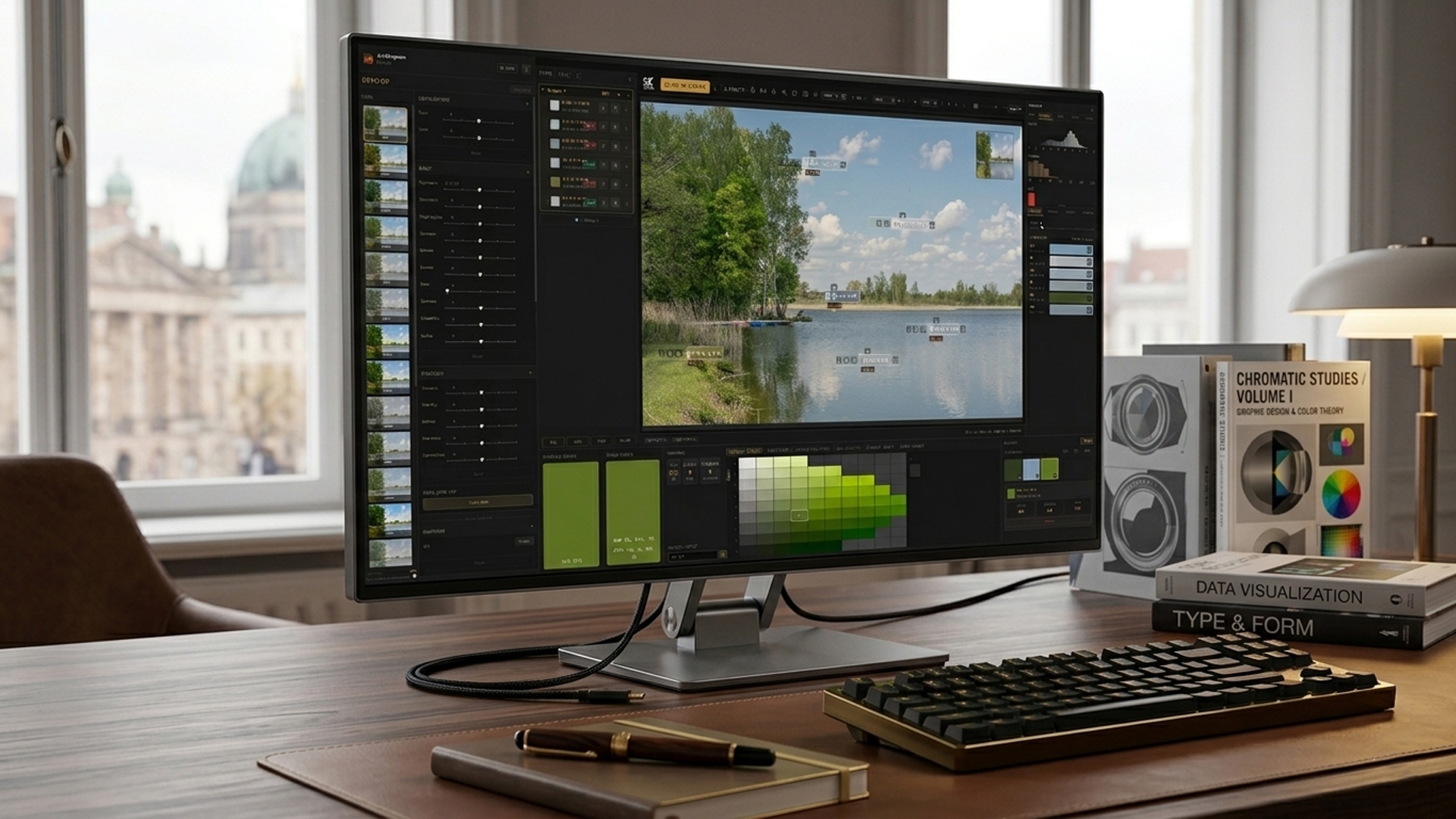
The app uses the proven Munsell color system to evaluate colors the way we painters mix them: by Hue, Value, and Chroma. Through clever AI-assisted programming, Artwingman stays extremely lean, requires no expensive cloud infrastructure, and delivers mathematical precision without data hunger.
What you can do with it
Color & Value Analysis
Measure instead of guess. Analyze every pixel in your image using the scientific Munsell system (Hue, Value, Chroma). See instantly whether your contrasts and brightness levels are correct.
Palette Extraction
Upload your reference photos or your own work. The tool filters out the mathematically pure color spectrum and creates harmonious mixing palettes for your next piece.
Paint Match (Tube Finder)
No more wrong purchases at the art store. ArtWingman compares your desired color against a digital catalog of 19,666 real artist paints from 290 premium brands and shows you the exact matching tube with a direct link.
Image Develop
Prepare your reference photos professionally. With integrated gradation curves, color corrections, and filters, you will see your subjects with fresh eyes before the brush touches the canvas.
Paint Pad
Paint digitally with real pigments. Twelve artist pigments mix like wet oil paint on a palette — Ultramarine and a cool yellow really turn green — with brushes, glazes, pencils, airbrush, ballpoint and eraser on textured paper.
Palette Translation
See your reference as if it were painted with your own paints. Pick a palette or just a few tubes — say Ivory Black, Titanium White, Cadmium Yellow and a red — and ArtWingman translates the photo into what those paints can really mix, with a recipe for every color.
Composition
Ten classical composition guides from the Rule of Thirds to the Golden Spiral, Dynamic Symmetry and Root Rectangles, plus Visual Weight: see where the eye is drawn and whether your picture is in balance.
Paint Pad — paint with real pigments
A painting surface that behaves like a real palette. Every stroke carries actual pigment amounts, so mixes, glazes and tints come out the way they would with oil paint — on paper you can feel, with the tools of a real studio.
Open Paint PadReal pigment mixing
Twelve artist pigments — Titanium White, Cadmium Yellow Deep, Bismuth Vanadate Yellow, Yellow Ochre, Pyrrole Red, Cadmium Red Medium, Alizarin Crimson Permanent, Ultramarine, Phthalo Blue, Phthalo Green, Viridian and Ivory Black — simulated with a Kubelka-Munk model fitted to measured paint data. Colors mix physically on the canvas, not as RGB.
Wet paint & glazes
The brush picks up and blends wet paint. Wet and Water sliders take you from thick impasto to transparent glazes; Dry fixes a layer so you can glaze over it. Two layers with opacity, and hold the brush still to load more paint, like squeezing the tube.
Eight brush tips
Round, Flat, Filbert, Bristle, Fan, Knife, Dry Brush and Wash — plus Coat for clean glazing layers, Blend for soft transitions and Wipe to lift wet paint with a cloth.
Pencils 4H – 8B & smudge
Eight graphite grades from hard and grainy to soft, wide and dark, reacting to pen pressure and the paper grain. Smudge tool for blending graphite.
Airbrush & ballpoint pen
A soft airbrush that builds up with every pass — from fine mist to visible droplets. A ballpoint pen in blue, black and red with an even line and ink that blots where you pause.
Soft & hard eraser
Erases wet paint, graphite and even dried paint. Amount works as transparency, Texture erases along the paper grain — structured, like a real eraser on rough paper.
Mixing panel & swatches
Mix a recipe in parts from up to five colors plus white, load the brush with the real pigment recipe, or pick from the Color Mix triangle. Keep up to 12 mixes as swatches — pin your favorites, delete the rest.
Papers, grain & color charts
Several paper tones or a custom ground, with a Grain slider from smooth to rough that you can see and feel in every stroke. Pre-printed color-chart templates (5 × 11 and 11 × 5 boxes with label lines) for your own mixing charts.
Navigator circle
Rotate the sheet like real paper, zoom precisely and pan with one hand — a semi-transparent circle that stays open while you paint. Pinch zoom and mouse wheel work too.
Save, export & tablet ready
Undo/redo, save and reopen projects (.ora), export as PNG with an embedded sRGB profile. Pen pressure, palm-friendly corner docks and a recent-tools dock on tablets.
All Tools at a Glance
Analysis & Measurement
Dynamic Pixel Finder · Multi-Shape Area Pins (Circle/Square/Rect up to 100px) · Relative Value Comparison (Reference Keying) · Munsell/RGB/CMYK Instant Toggle · Hue Shift · Color Temperature Analysis · Dynamic Range Zones (Value & Chroma) · Hue Profile (dominant hue distribution)
Histograms
Precise distribution curves for Value · RGB · CMYK · Chroma · Munsell Keying
Palette Power
Adaptive Palettes · Source Palettes · Artist Palettes · Auto Palette Generator (2–24 steps) · Color Mix Split-Primary (up to 13,000 mixed swatches) · Limited Check (Zorn / Split-Primary reachability) · Palette Translation (Smooth / Snap / Mix piles, your own paint selection, Apply to image) · Export as PNG Screenshot or ASE / JSON
Composition
Rule of Thirds · Golden Section · Golden Spiral (Fibonacci) · Golden Triangle · Dynamic Symmetry · Harmonic Armature · Rabatment · Root Rectangles · Center & Symmetry · Baroque / Sinister Diagonal · Visual Weight (centre of weight, hot spots, heatmap, balance) · Compose overlay in Paint Pad
Develop Lab
Exposure · Curves · Color Grading · LUT Support (.cube) · Selective Color · Photo Filter · Precise Resize (px/cm/mm/inch with resolution & aspect lock)
Paint Pad
Real pigment mixing (Kubelka-Munk) · 8 brush tips · Coat / Blend / Wipe · Pencils 4H–8B + Smudge · Airbrush · Ballpoint pen · Soft & hard eraser · Mixing panel · Pinnable mix swatches · Paper grain · Color-chart templates · Navigator (rotate / zoom / pan) · Layers · .ora projects
Studio Comfort
Color Catalog (19,666 colors / 290 top brands) · Paint Match direct links (closest match per brand, ΔE ≤ 10) · Plain-English ISCC-NBS color names · Pigment-based mixing tips · Image Info panel (file & EXIF data) · Minimap · Up to 64 memory pins per project · Optimized mobile layout for the studio easel tablet
The highlights of your studio pipeline
WebGL Real-Time Development
Edit your reference image like in professional RAW converters. Exposure, gradation curves, contrast or LUTs change the image without lag. The special part: your Munsell histograms, charts and keys react live to every slider movement.
Palette Translation: Your Reference, Painted With Your Paints
Most tools only tell you which colors you cannot mix. ArtWingman translates the photo instead: every color is moved into what your palette can really mix, based on thousands of measured paint mixtures. Choose Ext. Split-Primary or Zorn, or switch single tubes off — with only Ivory Black and Titanium White the sky turns into the cool blue-grey Zorn was famous for. Smooth keeps everything that is already mixable, Snap puts every color on a real measured mixture, and Mix piles rebuilds the image from a handful of premixed piles — click one to see where it goes on the canvas. Each color comes with its recipe, and Apply to image freezes the result so pins, histograms and export work with it.
Composition Guides & Visual Weight
Ten classical composition guides laid over your reference: Rule of Thirds, Golden Section, a Golden Spiral you can flip through all four orientations, Golden Triangle, Dynamic Symmetry, Harmonic Armature, Rabatment, Root Rectangles that detect √2 to √5 formats, Center & Symmetry and the Baroque and Sinister diagonals — each with a short explanation for artists. Visual Weight shows where the eye is drawn: centre of weight, the strongest hot spots, a heatmap and the left/right and top/bottom balance, updated live while you edit. The same guides sit on top of your painting in Paint Pad.
3D Munsell Freedom (Hue, Value & Chroma)
Break out of rigid tables. Artwingman not only analyzes colors on a flat 2D axis (Value/Chroma), but lets you shift the hue in real time. See immediately how the harmonic relationships change. The Munsell Wheel even puts the perceptually accurate Munsell hue circle side by side with the classic 12-hue RGB/HSL wheel, so you can see exactly where the two systems agree and where your eye is being fooled. And every Munsell notation comes with its plain-English ISCC-NBS name (e.g. “Pale blue”, “Yellowish white”) right next to it — no more guessing what 5PB 6/4 actually looks like.
The Bridge Builder: The Wolfe Method, Oklab & Real Pigment Physics
ArtWingman doesn’t just find the closest color — it finds the closest color the way your eye actually perceives it. The Wolfe Method runs Frank-Wolfe optimization in Oklab, a perceptually uniform color space, to calculate the exact mixing ratio of your tubes that gets closest to any target color. For a growing set of pigments, ArtWingman holds real measured spectral reflectance data (Kubelka-Munk absorption/scattering, not estimates), so mixes between complementary tubes behave like real paint on a palette knife: Ultramarine and a cool yellow genuinely mix toward green instead of collapsing into grey. Auto Palette Generator (2–24 steps): Want to paint a minimalist poster-style image or break a complex portrait into clean color steps? Generate palettes with exactly the number of gradations you need for your project with one click. Each step is immediately matched to real oil paint tubes.
Paint Match & The Integrated Crop Tool
Prepare your subject perfectly from the start. Use the integrated crop tool to choose the perfect image section. Artwingman then compares the pixels with 19,666 real artist colors from 290 premium brands and delivers exact, percentage-based mix recipes for your oil palette. Fair by design: you get the single closest match per brand (capped at ΔE ≤ 10), so one brand’s near-duplicate tubes can never crowd out the rest of your options.
Interactive & Movable Pins
Place any number of measurement points on your subject and move them instantly. Switch seamlessly between Munsell, RGB and CMYK — perfect for painters coming from digital design who want to learn classical color theory. Turn any pin into a live color key: isolate every matching area in solid red by that pin’s Value, Chroma or Hue, with the exact Munsell delta shown as you drag the tolerance slider.
Relative Value Matching (Reference Keying)
Select any pin as your central reference point. Artwingman instantly calculates the exact brightness deviation (↑+5.5 or ↓−3.8) of all other pins relative to that point. See at a glance whether the shadow in the background relates correctly to the light on the portrait.
Area Sampling instead of Pixel Guessing (up to 100 px)
A single pixel never captures the truth of a rough surface. Expand your pins to up to 100 pixels in diameter to determine the perfect mathematical average of an area. Full flexibility for every subject: Circle mode for organic forms, Square mode for precise geometric color fields, Rectangle mode (portrait & landscape) for architectural lines, horizons or targeted brush strokes.
Dynamic Munsell Keying with Real-Time Sliders
Control the color mood of your image like a director. The integrated keying system lets you visually lock your entire subject to specific Munsell ranges — extremely fast, fluid and without lag. Full slider control: determine how strictly you filter or match your image colors. Three dimensions to separate or unite: key by lightness (Value), saturation (Chroma) or pure hue. The result for painters: create instant harmonic color climate analyses. See at a glance which image areas break out of the desired mood to perfectly tune your physical mixes.
The Source Palette: Complete Image DNA with One Click
Standing in front of a blank canvas and want to start immediately? Upload your reference image and click Analyze. The highly efficient ArtWingman algorithm scans the entire subject in milliseconds and automatically creates the perfect working foundation: The 24 Core Swatches — the tool filters out the 24 most important and dominant colors that make up the image. Instant mix recipes — for each of these 24 measured color tiles you get the exact percentage of which oil tubes to mix together. The ultimate studio start: no more searching, no more guessing. Before the first brush stroke you know exactly which colors to squeeze onto your palette to cover the entire image flawlessly.
Your Palette: Your Real Tubes as a Mathematical Foundation
ArtWingman does not force you to buy new colors. The app calculates exactly with what you have at your easel. Register your inventory: simply activate the exact oil, acrylic or watercolor tubes you own. Advanced default set: a proven, versatile pro palette is pre-loaded so you can start immediately. No wish-list colors, pure practice: when you run the Source Palette, the algorithm uses only the colors from Your Palette. You only get recipes you can actually mix.
The Interactive Laboratory Color Catalog
290 premium brands · 19,666 physical color shades · continuously growing. Forget inaccurate digital color tables. ArtWingman uses real CIELAB color data to map the physical character of real artist tubes exactly in code. Our catalog is the ultimate reference work for your studio. Precision filtering: sort the entire global color range by your criteria — which binder is used (linseed oil, safflower oil, walnut oil, poppy seed oil or damar resin)? What about transparency [O/SO/ST/T] and lightfastness? Insider texts & pigment secrets: many special colors come with deeper insights. Learn immediately what makes a color special, its historical roots, or whether it is a toxic/regulated pigment. Automatic mixing tips: click any catalog color and get pigment-based notes on tinting strength, granulation, historical “Hue” substitutes and matching white types — the kind of knowledge that used to take years at the easel. Community-powered: the catalog lives! Through an integrated feedback system you can report errors, suggest missing favorite tubes or propose new features.
Relative Temperature Slider: Warm vs. Cold in Direct Comparison
Our brain is easily fooled by color temperatures — ArtWingman is not. Instantly recognize the invisible thermal vibrations of your subject. Objective temperature comparison: move the temperature slider to visualize the warmth or coolness of a specific pixel (or up to a 100px area) in exact ratio to all other colors in the image. Perfect light-shadow relationships: see at a glance whether your shadow areas have the necessary complementary coolness to make your warm light tones literally glow on the canvas. No more optical illusions: protect yourself from the notorious simultaneous contrast in the studio. ArtWingman isolates the temperature value mathematically using the CIELAB axes and delivers the naked truth.
The Real-Time Histogram Center: Full Data Control via WebGL
End the blind flight in image composition. Monitor the mathematical distribution of your colors and tonal values through five specialized live histograms — computed without delay directly in your browser. Munsell Value Histogram: the most important tool for image structure. See instantly whether your image has a balanced distribution of light, midtone and shadow or sinks into extremes. Munsell Chroma & Hue Histograms: analyze the exact saturation DNA and hue distribution of your subject. Perfect for precisely controlling the color climate before painting. RGB & CMYK Live Curves: the perfect bridge for digital artists, concept artists and designers. Monitor color channels in real-time in the systems you are used to from Photoshop or Lightroom. WebGL-powered synchronization: move the sliders for exposure, contrast or temperature and experience how all five histograms react synchronously in absolute real-time to every nuance.
Dynamic Range: Find Your Darkest, Lightest, Grayest & Most Saturated Zones
Stop guessing where your extremes are. Dynamic Range automatically marks the darkest and lightest Value zones and the lowest and highest Chroma zones in your reference, tinted directly on the image. Adjustable zone size: widen or narrow each zone with a single slider to see exactly how much of your image sits at the tonal or chromatic extremes. Read the numbers, not just the impression: exact Value and Chroma boundaries for every zone, so you know precisely how far to push your darks, lights and saturation before you touch the canvas.
Hue Profile: The Dominant Colors of Your Reference, Ranked
Every subject has a color signature — Hue Profile finds it. The panel ranks the dominant Munsell hue families in your image by their share of chromatic pixels, so you instantly know which two or three hues actually carry the piece. Turn any hue into a live zone: toggle a family on to highlight every matching area on the image, then fine-tune how tightly it matches with a per-hue tolerance slider (±5° to ±90°). Perfect for spotting a rogue hue that doesn’t belong to your intended palette, or confirming that your “green” landscape is really carrying more yellow-green and blue-green than you assumed.
Exact Resize & Full Image Info, Right Next to Your Reference
Know exactly what you’re working with. The Size panel resamples your reference to an exact width and height in px, cm, mm or inch, with a resolution field and a lockable aspect ratio — one click to Apply, one click to Undo. The Info panel reads the file straight: name, type, size, pixel and physical dimensions, and full EXIF data (camera, date taken, exposure, GPS) pulled directly from the JPEG, so you always know where and how a reference photo was actually shot.